


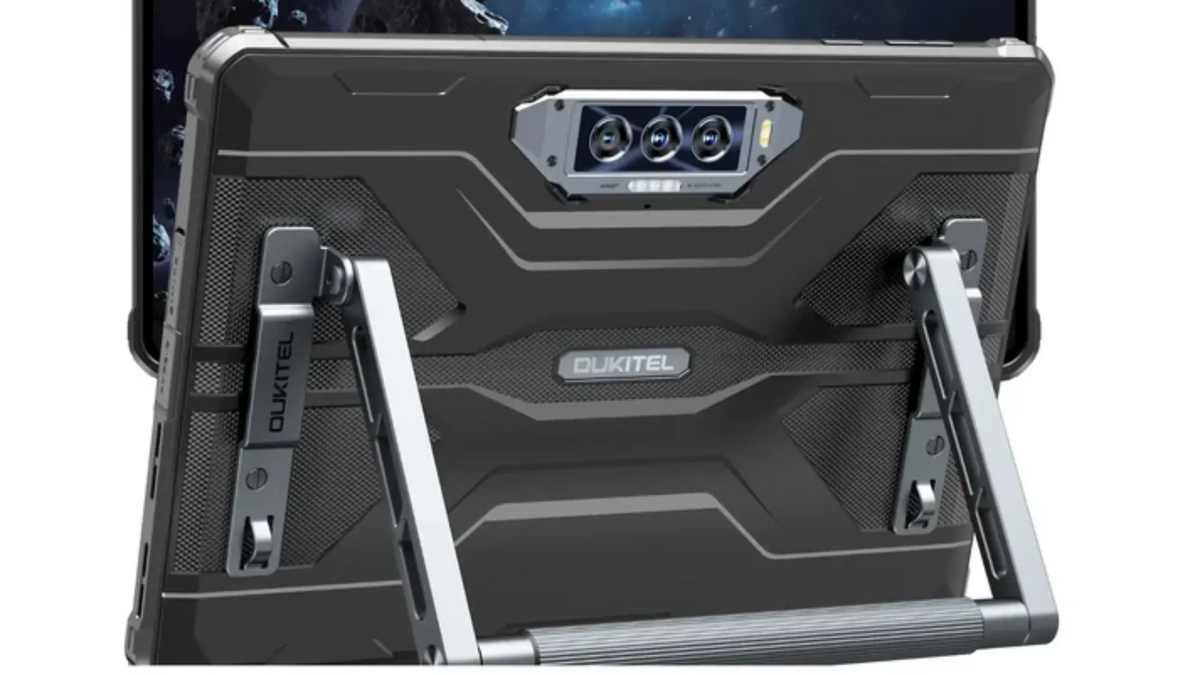
For construction, logistics and field work, a tablet must be more than just fast and lightweight — it has to endure dust, drops, rain, rough handling, and long workdays. A regular consumer tablet designed for home or office falls short. What you need is a rugged tablet purpose-built for work: durable, portable, easy to mount, long-lasting and ready for real-world conditions. In this article, we explore what makes a rugged tablet ideal for construction and logistics, the criteria to check before buying, and how modern rugged tablets bring together portability and power in a field-ready package.
Why Rugged Tablets Are Essential for Construction & Logistics Work
In job sites, warehouses or logistics yards, environmental hazards are many: dust, mud, water sprays, drops on concrete, vibration, temperature extremes, and frequent handling. Using a regular tablet under these conditions risks screen damage, port failure, or complete breakdown. A rugged tablet solves these problems by offering:
- Sealed and reinforced build for water, dust, and impact resistance
- Long battery life for uninterrupted workday use without frequent charging
- Field-ready usability — glove-friendly touch, rugged grips, mounting or hands-free options
- Durable screen and chassis that survive drops, vibration, and daily wear
In short: rugged tablets transform from fragile consumer gadgets into reliable work tools that stand up to real-world stress.
Key Features to Look for in a Rugged Work Tablet

If you are shopping for a slab device that must survive the field, prioritize the following:
True Rugged Sealing & Impact Resistance
A tablet for work must carry industrial-grade protection against dust, water, drops and temperature extremes. Certifications like IP68, sometimes IP69K, and MIL-STD-810H indicate the device has undergone testing for immersion, high-pressure spray, shock, vibration, and environmental stress. This ensures the tablet stays functional even after being dropped or exposed to weather — essential for field conditions.
Large Battery & Extended Usage
Power availability is often uncertain on worksites or during transport. A rugged tablet with a large battery capacity ensures long uptime — enough for inspections, documentation, communications and GPS mapping throughout a full shift or multiple days. In many cases, the battery also supports reverse charging, allowing you to power other devices if needed.
Field-Ready Design: Mounts, Straps, Glove/Wet Touch
Practical usability under work conditions differentiates a rugged tablet from a regular one. Features like glove-touch responsive screens, reinforced frames, built-in handles or straps, and compatible mounts for vehicles or equipment racks make on-site operation easier. Tablets that support wet hands / gloves ensure continued operation in rain or dusty environments without downtime.
Outdoor-Ready Display & Readability
Working outdoors or in bright environments demands a screen that remains visible despite glare and sun. Bright displays, anti-glare coating or anti-reflection treatment, and robust glass protection (e.g., Gorilla Glass) help ensure the tablet is usable in any lighting condition. A large display gives room for maps, blueprints, checklists and documentation review.
Performance & Connectivity for Workload
Field work may involve GPS, mapping, data entry, photo/video documentation, communication and apps for logistics. A rugged tablet with a modern processor, enough RAM and storage, GPS/GNSS support, stable cellular or Wi-Fi connection ensures smooth, reliable performance. Good specs help when capturing images, scanning barcodes, uploading reports, or navigating remote sites.
Versatile Cameras & Documentation Tools
Whether you record site progress, capture inventory, or inspect installations, a rugged tablet with versatile cameras — wide, macro, maybe even night-vision or strong low light — helps document work effectively. This reduces reliance on separate cameras or phones, consolidating tools in one device.
Mount-and-Carry Flexibility
In construction or vehicle-based logistics, the ability to mount a tablet in a vehicle, crane, forklift, or van rack improves safety and accessibility. Straps, handles, docking mounts, shoulder-carry options or cradle compatibility make a rugged tablet usable across multiple workflows — from site to warehouse to transport.
How a Modern Rugged Tablet Meets These Needs

Today’s rugged tablets have evolved beyond industrial niches — they now blend durability, portability and smart performance so field professionals don’t sacrifice comfort for toughness. A well-built rugged tablet today can combine:
- Heavy-duty sealing and drop protection (dust, water, shock)
- Large battery capacity that lasts a full day’s work or more
- Responsive touch even with gloves, and outdoor-visible display
- Powerful chipset and enough RAM for apps, data, GPS, and multitasking
- Camera array for documentation needs
- Built-in handles/straps or mount compatibility for flexible deployment
This convergence of features means a rugged tablet isn’t just “a tough tablet” — it’s a toolbox, a mobile workstation, a field-office, and a data-capture device — all in one.
Choosing the Right Rugged Tablet for Work: A Quick Checklist

Use this checklist when comparing rugged tablets for construction, logistics, or field deployment:
- Check certifications: IP68 or better, MIL-STD-810-series impact rating
- Battery capacity: Long-lasting (preferably 20,000 mAh+ or efficient enough for full-day workloads)
- Display: large, bright, readable outdoors, sturdy glass, anti-glare if possible
- Touch responsiveness: works with gloves or wet fingers
- Build and ergonomics: handles, straps, mounts, rugged ports
- Performance specs: sufficient RAM, storage, GPS or GNSS support, stable connectivity
- Camera and documentation tools: versatile lenses, good resolution, optional scanning or night vision if needed
- Mounting or cradle support: vehicle mounts, belt clips, shoulder straps — based on your workflow
-
Software support: up-to-date Android, compatibility with field apps, security updates
If a tablet meets most or all of these criteria, it qualifies as a best rugged tablet for work — a serious candidate for construction or logistics deployment.
Practical Use Cases: Where Rugged Tablets Shine
- Construction & Site Inspection — Use rugged tablets for blueprint viewing, status logging, photo documentation, and on-site communication. Their sealing protects against dust, rain, cement splatter, and accidental drops; glove-friendly touch and bright display let you work in all conditions.
- Logistics & Warehouse Management — Mount a rugged tablet in a forklift, forklift cage or vehicle; use its cameras for package scanning, documentation; use battery life for long shifts; trusted for indoor/outdoor docks.
- Field Service & Maintenance — For technicians servicing remote infrastructure, pipelines, telecom towers — rugged tablets handle GPS navigation, checklists, diagnostics, photo/video reports; mounting support lets you belt-carry or vehicle-mount for constant access.
- Transport & Fleet Use — Drivers or operators needing navigation, inventory, scheduling — rugged tablets fixed in vehicle dashboards stays safe from vibration, weather and usage roughness; strong build and battery endurance are critical.
- Outdoor Inspection, Survey & Remote Work — For field research, surveying, environmental work, overlanding and mobile operations — rugged tablets offer GPS, offline maps, durability against elements, and long runtime for remote deployment without power outage concerns.
Frequently Asked Questions
What distinguishes a rugged tablet from a regular consumer tablet?
Regular tablets are designed for controlled indoor environments — smooth surfaces, mild conditions, gentle use. A rugged tablet is built for abuse: dust, water, drops, temperature extremes, vibration, frequent handling. Rugged tablets add reinforced frames, sealed ports, tougher glass, glove-touch, outdoor brightness — features that ordinary tablets don’t include or protect against.
Do rugged tablets sacrifice comfort or portability compared to regular ones?
Rugged tablets are often bulkier and heavier due to reinforcements, larger batteries and protective casing. But they make up for that with mounting or carry options — handles, straps, vehicle cradles — and are engineered to remain practical in field environments. For work where durability matters more than lightness, the trade-off is worth it.
Are rugged tablets only for industrial workers?
Not at all. While ideal for construction, logistics, field service and outdoor use, rugged tablets are also useful for outdoor education, field research, marine navigation, mobile offices, remote work, travel, disaster relief operations — anywhere durability, battery life and reliability in harsh conditions matter.
How important is battery capacity in a rugged tablet for work?
Very important. On-site, you may not have frequent access to charging. A large battery or efficient power management ensures you can work full shifts (or days) without recharge, especially when using GPS, data entry, photos, field apps and connectivity. Low battery means downtime — not just inconvenience.
Should I consider rugged tablets only for new purchases, or can I convert a regular tablet for field use?
While you can add rugged cases, screen protectors or straps to regular tablets, that only helps with minor protection. The internal sealing, reinforced internals, drop resistance, and certification testing of a rugged tablet are far more reliable for real field use. For serious construction or logistics work, investing in a purpose-built rugged tablet is strongly recommended.
Conclusion
For construction, logistics, field service, warehousing, fleet management or any outdoor work, a rugged tablet isn’t a luxury — it’s a necessity. The difference between a consumer tablet and a rugged Android tablet can be the difference between a working device at the end of the day, or a broken tool that halts progress.
When you prioritize certifications, battery life, mounting options, glove/wet-touch usability, sturdy build and performance, you’re not just buying a tablet — you’re investing in reliability and productivity.
If you pick a tablet that meets the criteria above, you get more than a gadget — you get a work-ready companion. A tablet that’s portable, durable, mountable and built to last. That’s what the best rugged tablet looks like in 2025.


Leave a comment
Your email address will not be published. Required fields are marked *