


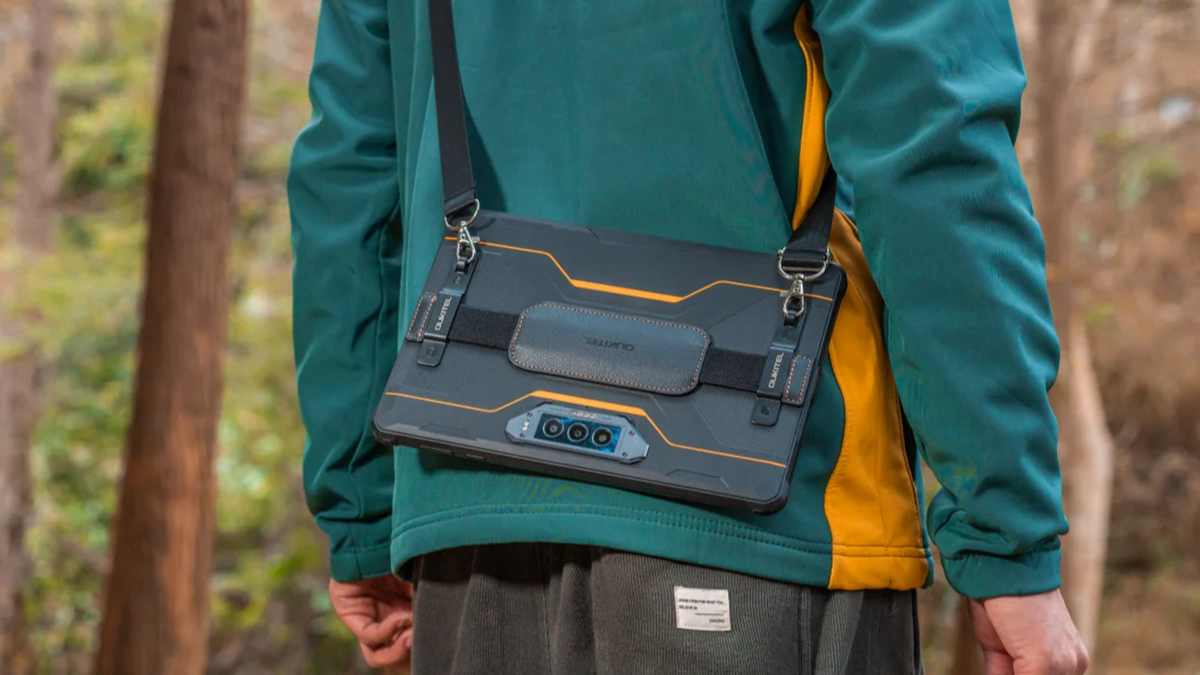
A waterproof tablet is a rugged tablet built to resist water, dust, and rough handling. It usually has sealed ports, a reinforced body, and protection ratings such as IP68, IP69K, or MIL-STD-810H.
This guide explains how waterproof tablet ratings work, where these tablets are most useful, what to check before buying, and how to use one safely in wet, dusty, or outdoor environments.

Why Rain, Dust, and Drop Protection Matter Together
A tablet used outdoors rarely faces just one risk. Rain, dust, mud, vibration, and drops often happen in the same workday. A waterproof tablet helps keep maps, forms, inventory data, photos, and communication tools accessible when a regular tablet may not hold up. This matters most for field workers, warehouse teams, construction crews, campers, travelers, and anyone using a tablet outside a clean indoor setting.
How Waterproof Tablet Ratings Work
Waterproof tablet ratings show how well a device handles dust, water, drops, and harsh conditions. Start with the IP rating, then check the brand’s limits for water depth, pressure, and operating temperature.
Understanding IP Ratings
An IP rating has two numbers.
The first number shows protection against solids such as dust. A “6” means the device is dust-tight under test conditions.
The second number shows water protection. For example, IP68 usually means the tablet can handle dust and temporary water immersion under specific conditions.
For outdoor work, field use, and dusty environments, IP68 is a strong starting point.
IP68 vs IP69K: What Is the Difference?
P68 and IP69K both relate to water and dust protection, but they are tested for different types of exposure.
|
Rating |
Main Protection |
Best For |
What to Check |
|
IP68 |
Dust protection and temporary water immersion |
Rain, splashes, outdoor work, accidental drops into shallow water |
Listed water depth and immersion time |
|
IP69K |
High-pressure, high-temperature water jets |
Industrial cleaning, vehicle work, factories, washdown areas |
Whether pressure washing is allowed |
|
IP68 + IP69K |
Broader protection against water and dust |
Harsh outdoor or industrial environments |
Manufacturer’s exact use limits |
A tablet with both IP68 and IP69K gives broader protection, but users should still avoid unnecessary high-pressure water unless the brand clearly allows it.
Water Resistant vs Waterproof
Water resistant means the tablet can handle limited moisture, such as light splashes.
Waterproof usually means stronger tested protection against water exposure, often supported by a rating such as IP68.
For rain, outdoor navigation, construction, logistics, field inspections, or emergency use, a waterproof rugged tablet is usually the safer choice.
Best Use Cases for a Waterproof Tablet
A waterproof tablet is useful when users need a larger screen than a phone and stronger protection than a regular tablet.
Construction and Maintenance Work
On construction and maintenance sites, a waterproof tablet can handle digital plans, checklists, repair records, and inspection photos while facing dust, rain, tools, and drops. For this use, focus on water protection, drop resistance, a bright screen, and full-day battery life.
Outdoor Navigation and Field Data Collection
For fieldwork, a waterproof tablet keeps GPS maps, forms, photos, and offline documents usable in rain, mud, and bright sunlight. Screen brightness, battery life, GPS support, and rugged protection matter most.
Warehouse, Logistics, and Inventory Tasks
Warehouses and logistics teams need tablets that can handle dust, drops, scanning tasks, and fast movement between shelves, trucks, and loading areas.
For this type of work, a waterproof tablet should do more than resist splashes. A model like the OUKITEL RT10 Industry 5G Rugged Tablet can fit inventory checks, shipment tracking, and equipment management because it includes a built-in 2D barcode scanner, an 11-inch high-brightness display, and a large 25000mAh battery.
The barcode scanner is useful for QR codes, shipment labels, inventory tags, and equipment records. It can also reduce the need for a separate handheld scanner.
Camping, Travel, and Emergency Use
A waterproof tablet is also useful for camping, road trips, boating support, and emergency kits. It can store offline maps, weather apps, documents, repair guides, photos, and emergency contacts.
For outdoor navigation and field data collection, the OUKITEL RT10 5G Rugged Tablet is a relevant option. Its 11-inch high-brightness display helps with outdoor viewing, while the 25000mAh battery supports longer use away from a desk or power outlet.
For travel and emergency use, battery life, screen visibility, rugged protection, and portability should be the main priorities.

How to Choose the Best Waterproof Tablet
The best waterproof tablet depends on where it will be used. A tablet for a warehouse, construction site, camping trip, or vehicle mount may need different features.
Check the IP Rating First
Start with the IP rating. IP68 is a good baseline for outdoor and work use, while IP69K is useful for strong spray or washdown cleaning.
Also check the listed immersion depth, time, and water pressure limits.
Look for Drop and Impact Protection
Waterproofing does not prevent screen or frame damage. For job sites, warehouses, vehicles, and outdoor trips, look for reinforced corners, raised screen edges, a rugged frame, and MIL-STD-810H testing if available.
Consider Screen Brightness and Touch Response
A waterproof tablet used outdoors should stay readable in daylight. High brightness, anti-glare design, glove-friendly touch, and wet-touch support can make field use easier.
Choose the Right Battery Life for Outdoor Use
GPS, mobile data, high brightness, cameras, and scanning can drain power quickly. Choose a battery that can last through your longest workday, shift, or trip.
Balance Rugged Design With Portability
Rugged tablets are usually heavier because of stronger frames, larger batteries, and sealed designs. A larger model may suit vehicles or warehouses, while a lighter option is easier to carry all day.
Practical Tips for Using a Waterproof Tablet
A waterproof tablet is tougher than a regular tablet, but proper care still helps protect its ports, seals, and screen.
- Avoid water pressure: Do not spray the tablet with high-pressure water unless the manufacturer says it is safe.
- Clean after field use: Wipe away dust, mud, and sand, especially around buttons, speakers, cameras, and port covers.
- Dry before charging: Make sure the charging port is fully dry before connecting a cable.
- Protect the screen: Use a screen protector if the tablet is used near tools, gravel, racks, or rough gear.
- Inspect after drops: Check corners, seals, port covers, and the screen before exposing the tablet to water again.
FAQ
Can you use a waterproof tablet in saltwater environments?
Yes, but with care. Saltwater is more corrosive than fresh water. If the tablet is exposed to seawater, rinse it with fresh water only if the manufacturer allows it, then dry it fully before charging.
Do waterproof tablets work well in cold or hot weather?
Many rugged tablets are designed for wider temperature ranges than regular tablets. Still, extreme cold can reduce battery life, and extreme heat can affect charging or screen performance. Check the listed operating temperature before buying.
Who should choose a waterproof tablet instead of a regular tablet?
Choose a waterproof tablet if you use your device outdoors, around water, in dusty spaces, or in places where drops are likely. It is a good fit for construction, logistics, fieldwork, camping, travel, marine support, and emergency use.
Is a waterproof tablet suitable for marine or boating use?
It can be suitable for boating support, maps, weather checks, and emergency documents. Use a secure mount, strap, or waterproof case for extra protection, especially around saltwater.
Are waterproof tablets heavier than regular tablets?
Usually, yes. Waterproof rugged tablets often have larger batteries, reinforced frames, and sealed designs. The added weight is the tradeoff for better durability.
Conclusion
A waterproof tablet is useful when a regular tablet may struggle with rain, dust, drops, or outdoor use. For construction, logistics, fieldwork, travel, and emergency use, it should offer more than basic water resistance.
Before buying, check the IP rating, drop protection, screen brightness, battery life, touch response, and portability. The right waterproof tablet should match the environment where it will actually be used.



Leave a comment
Your email address will not be published. Required fields are marked *